7 장 R-Shiny
- R-Shiny는 RStudio를 이용하여 web기반의 어플리케이션 제작 도구임
7.1 Shiny 프로그램 시작 및 실행
7.1.1 Shiny 프로그램 시작
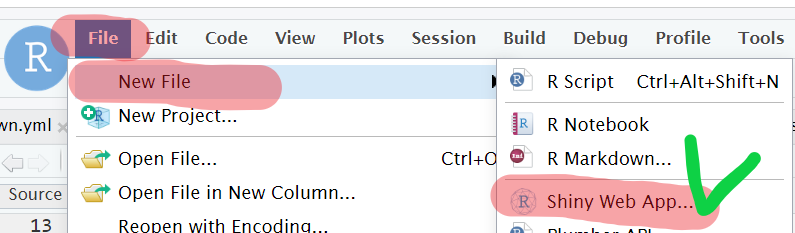
install.packages("shiny")R Studio: File ==> New File ==> Shiny Web App
Application name 지정, 디렉토리 생성…
- Application name: 실행 프로그램이름 지정 (여기서는
test로 지정) - App. type: Shiny 프로그램은 하나의 지정된 파일
app.R또는 두개의 지정파일(ui.R과 server.R)로 생성할 수 있음 - Create with directory: Shiny프로그램의 디렉토리 위치 지정
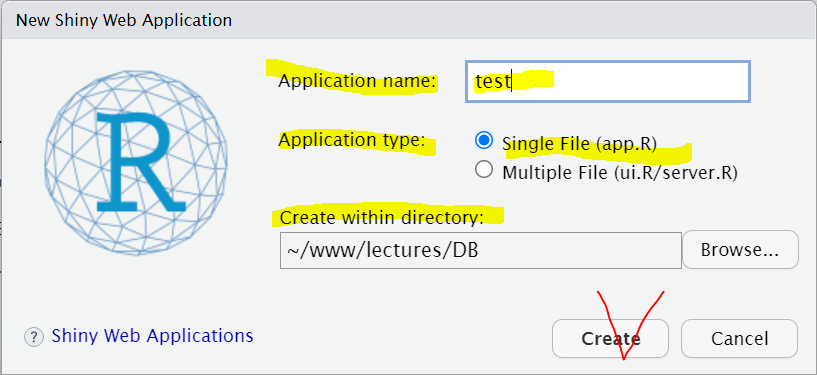
- Application name: 실행 프로그램이름 지정 (여기서는
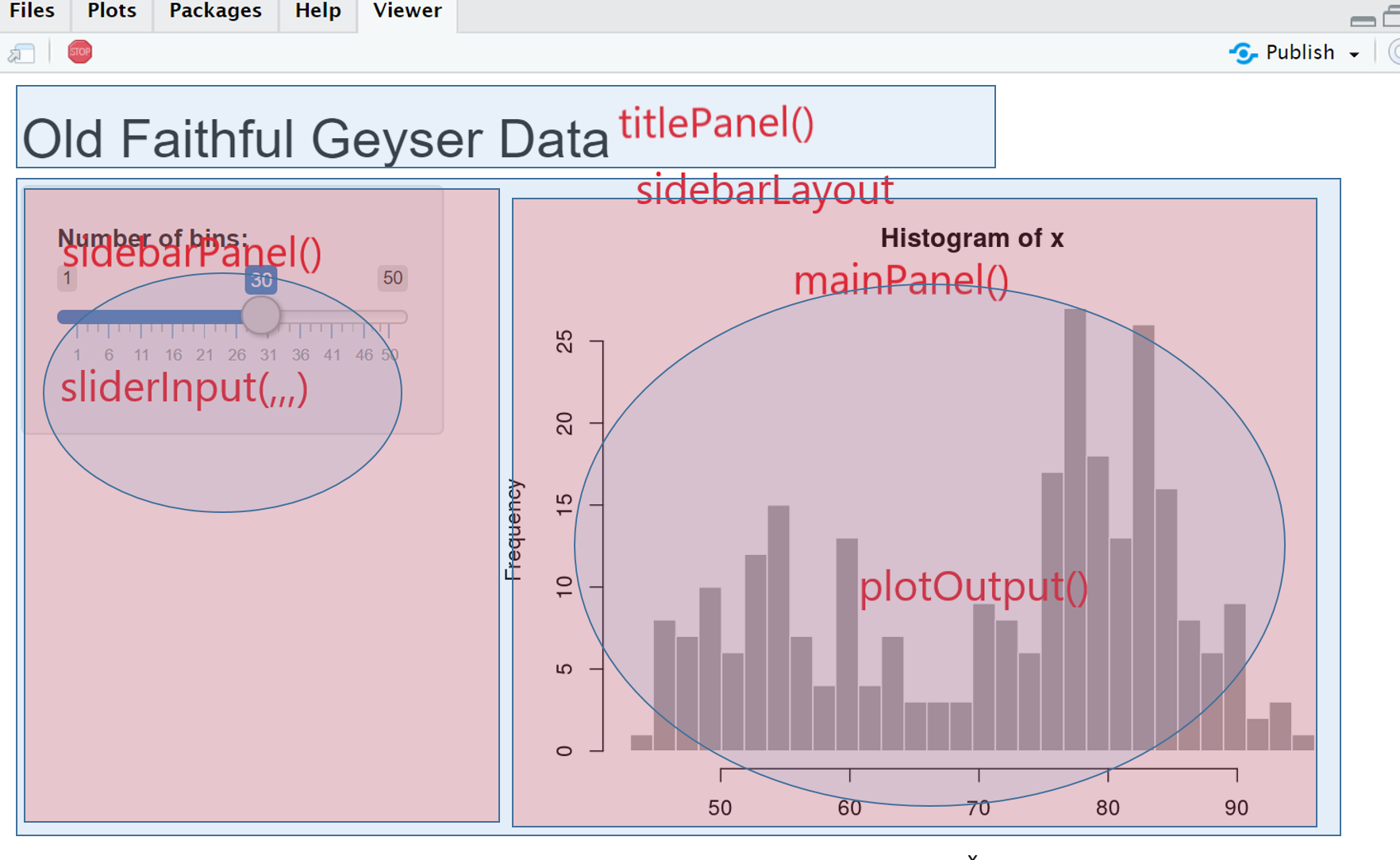
app.R생성(아래)function 기능설명 fluidPage() 페이지 레이아웃 지정 fluidRow() 행 레이아웃 지정 column() 컬럼 레이아웃 지정 titlePanel() App의 제목을 담는 panel sidebarLayout() sidebar와 main area의 레이아웃 지정 sidebarPanel() sidebar의 입력 컨트롤을 지정하는 panel mainPanel() sidebar의 입력 컨트롤에 따른 결과 출력 panel sliderInput() 슬라이더 입력 위젯 plotOutput() 서버에서 그림 출력 결과(renderPlot)를 UI 영역에 보여줌 library(shiny) # 라이브러리 # App. UI 구성 ui <- fluidPage( # Application title titlePanel("Old Faithful Geyser Data"), # Sidebar with a slider input for number of bins sidebarLayout( sidebarPanel( sliderInput(inputId="bins", label="Number of bins:", min = 1, max = 50, value = 30) ), # Show a plot of the generated distribution mainPanel( plotOutput(outputId="distPlot") ) ) ) # Define server logic required to draw a histogram server <- function(input, output) { output$distPlot <- renderPlot({ # generate bins based on input$bins from ui.R x <- faithful[, 2] bins <- seq(min(x), max(x), length.out = input$bins + 1) # draw the histogram with the specified number of bins hist(x, breaks = bins, col = 'darkgray', border = 'white') }) }
- 위젯(widget) 또는 컨트롤(control)
- 컴퓨터 사용자가 상호 작용하는 인터페이스 요소를 일컬음

7.1.3 Shiny Application의 구조
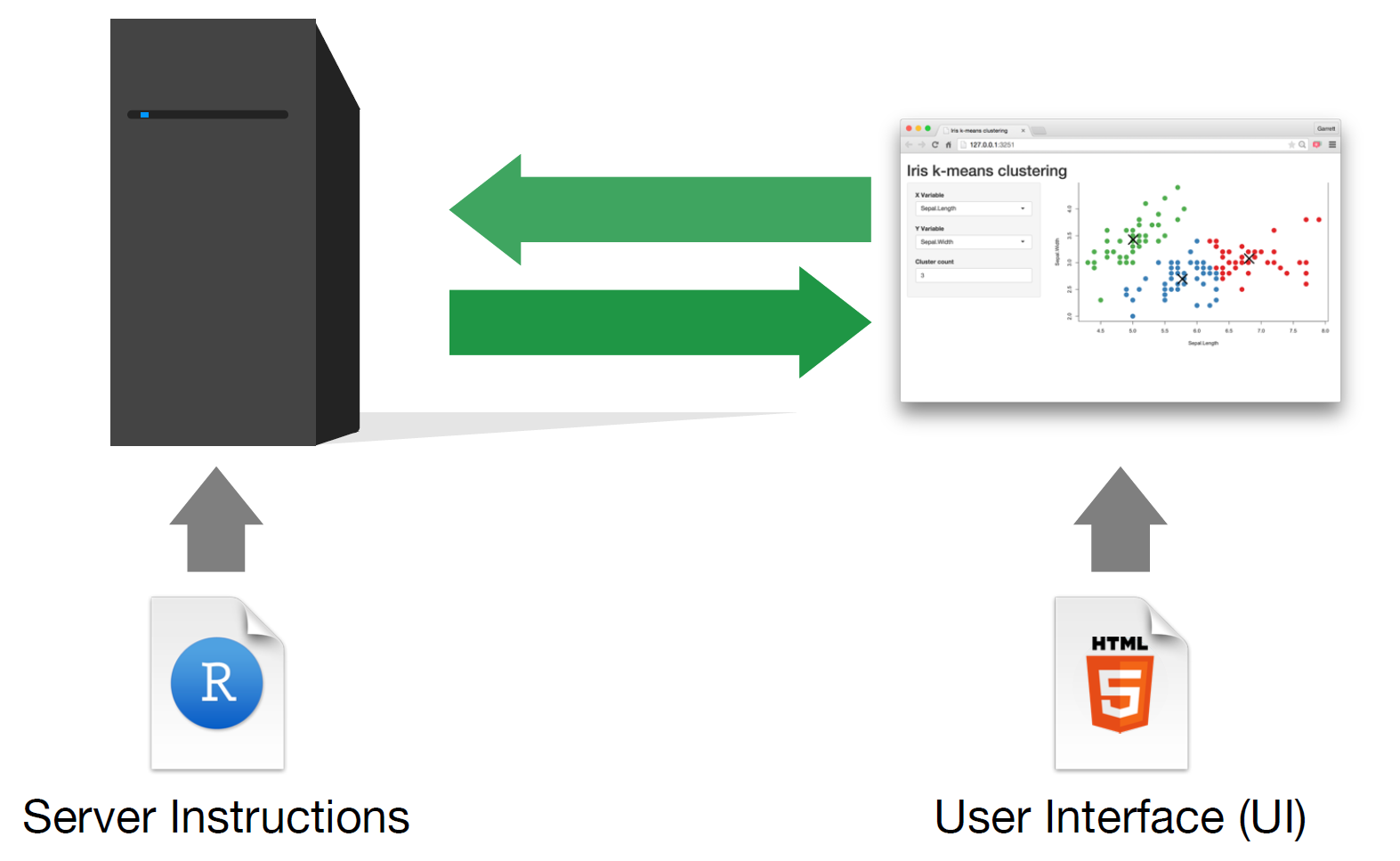
Shiny App은 대부분의 App과 마찬가지로 UI와 Server로 구분됨
- UI: 프로그램 실행시 화면에 보이는 것으로 사용자의 입력과 입력의 결과인 출력으로 구분
- Server는 UI에서 입력을 전달받아 내부에서 계산하여 출력UI로 전달하는 기능을 말함
UI Section
Server Section
input/output
server <- function(input, output)
- input: ui에서 입력하는 값들(리스트형태)
- output: server에서 계산된 출력값들의 객체(리스트 형태)
ui의
sliderInput("bins","Number of bins:",...)로 입력한 값은input$bins의 객체형태로 server로 전달됨sever의
output$distPlot은 ui의plotOutput("distPlot")을 통해 화면에 그려짐예시
# ui
mainPanel(
   plotOutput("distPlot")
)
# server

output$distPlot <- renderPlot({
    # generate bins based on input$bins from ui.R
    x    <- faithful[, 2]
    bins <- seq(min(x), max(x), length.out = input$bins + 1)
    # draw the histogram with the specified number of bins
    hist(x, breaks = bins, col = 'darkgray', border = 'white')
})
7.1.4 HTML 코드 작성을 위한 shiny 함수
Shiny UI에서 HTML코드를 삽입하는 함수
함수 HTML tag 설명 p()<p>A paragraph of text h1()<h1>A first level header h2()<h2>A second level header h3()<h3>A third level header h4()<h4>A fourth level header h5()<h5>A fifth level header h6()<h6>A sixth level header a()<a>A hyperlink br()<br>A line break (e.g. a blank line) div()<div>A division of text with a uniform style span()<span>An in-line division of text with a uniform style pre()<pre>Text ‘as is’ in a fixed width font code()<code>A formatted block of code img()<img>이미지 삽입, img(src = "my_image.png"), 이 경우 shiny프로그램의 서브디렉토리 인www디렉토리에 이미지를 저장함.strong()<strong>Bold text em()<em>Italicized text HTML()Directly passes a character string as HTML code
7.1.5 UI의 입출력
-
Shiny 함수 입력형태 actionButtonAction Button checkboxGroupInputA group of check boxes checkboxInputA single check box dateInputA calendar to aid date selection dateRangeInputA pair of calendars for selecting a date range fileInputA file upload control wizard helpTextHelp text that can be added to an input form numericInputA field to enter numbers radioButtonsA set of radio buttons selectInputA box with choices to select from sliderInputA slider bar submitButtonA submit button textInputA field to enter text 입력위젯 예제
# inputId
sliderInput(inputId = "slider1", label = "Slider", min = 0, max = 100, value = 50)
# outputId
#plotOutput(outputId = "plot1")
출력위젯: 서버의 결과를 UI에 표시, 즉 Server가 만들어낸 결과를 UI에 보여주기 위한 함수
Shiny 함수 서버의 출력 결과 dataTableOutput()데이터프레임 tableOutput()데이터프레임 htmlOutput()HTML 문서 imageOutput()그림파일 plotOutput()R로 작성한 그림 textOutput()R 텍스트 오브젝트 verbatimTextOutput()R코드 또는 텍스트 결과를 있는 그대로 보여줌
7.1.6 Example
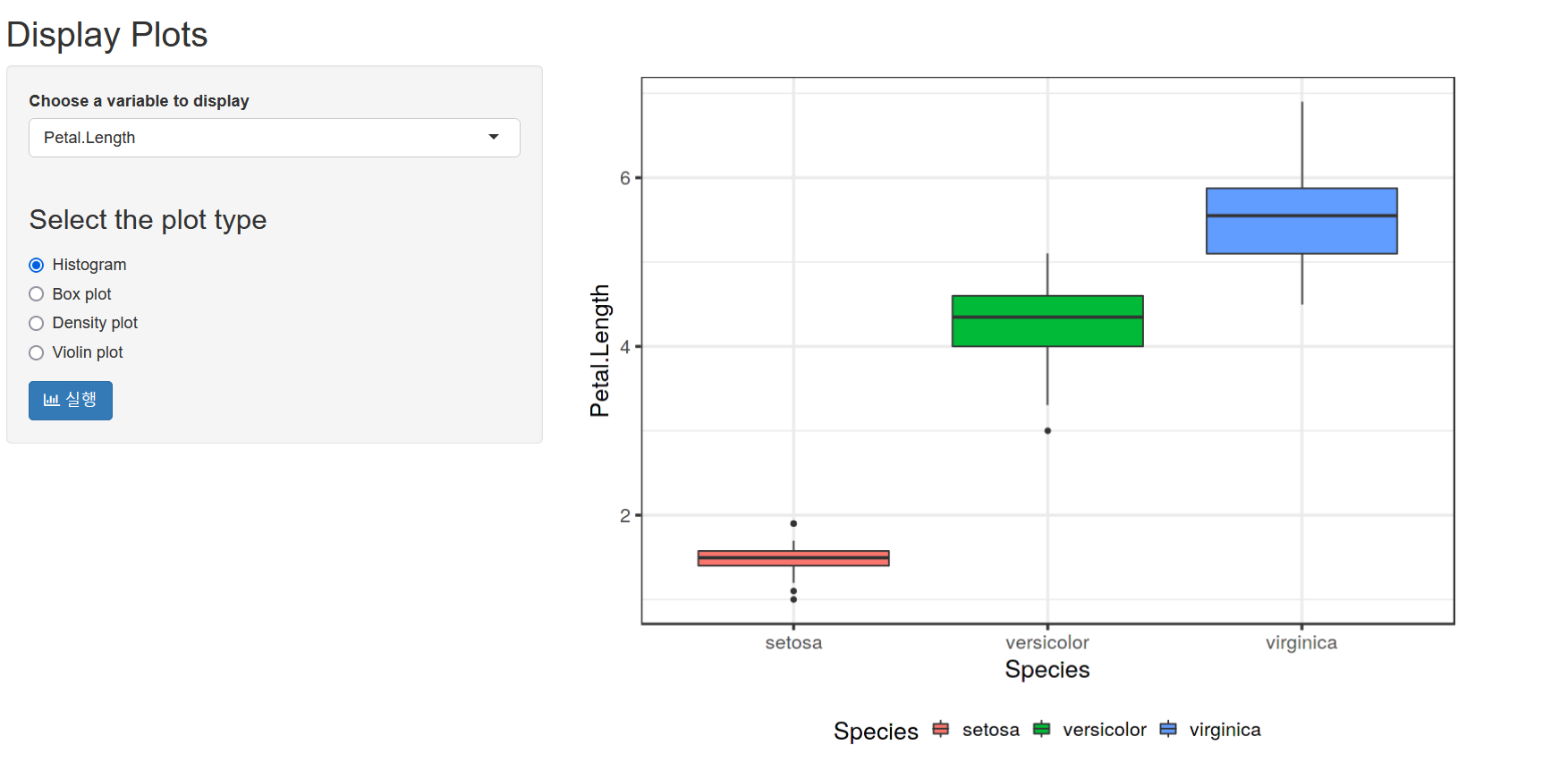
library(shiny)
library(ggplot2)

ui <- fluidPage(
    titlePanel("Display Plots"),
    sidebarLayout(
        sidebarPanel(
            selectInput("xvar",
                        label = "Choose a variable to display",
                        choices = list("Sepal.Length",
                                       "Sepal.Width",
                                       "Petal.Length",
                                       "Petal.Width"),
                        selected = "Sepal.Length"),
            radioButtons("plot_type",
                         h3("Select the plot type"),
                         choices = list("Histogram" = 1,
                                        "Box plot" = 2,
                                        "Density plot" = 3,
                                        "Violin plot"=4),
                         selected = 1),

            submitButton(text = '실행',  icon = icon("bar-chart-o"))
        ),
        mainPanel(
           plotOutput("distPlot", width='80%', height='600px')
        )
    )
)
server <- function(input, output) {
    output$distPlot <- renderPlot({
        g = ggplot(iris, aes_string(x = input$xvar, y="Species", fill="Species") )
        if(input$plot_type == 1){
          g = ggplot(iris, aes_string(x = input$xvar, fill="Species") )
          g = g + geom_histogram(alpha=0.9)
        }else if(input$plot_type == 2){
          g = g + geom_boxplot()  + coord_flip()
        }else if(input$plot_type == 3){
          g = ggplot(iris, aes_string(x = input$xvar, fill="Species") ) +
            geom_density(alpha = 0.8)
        }else if(input$plot_type == 4){
          g = g + geom_violin() + coord_flip()
        }else{
          NULL
        }
        g + theme_bw(base_size = 20) +
          theme(legend.position = "bottom")
    })
}

shinyApp(ui = ui, server = server)
7.2 R-shinydashboard
대시보드 (dashboard)는 사용자의전략목표/비즈니스프로세스와 관련된 주요 성과지표 (KPI)를 한 눈에 볼 수 있도록 하는 그래픽 사용자 인터페이스 (GUI)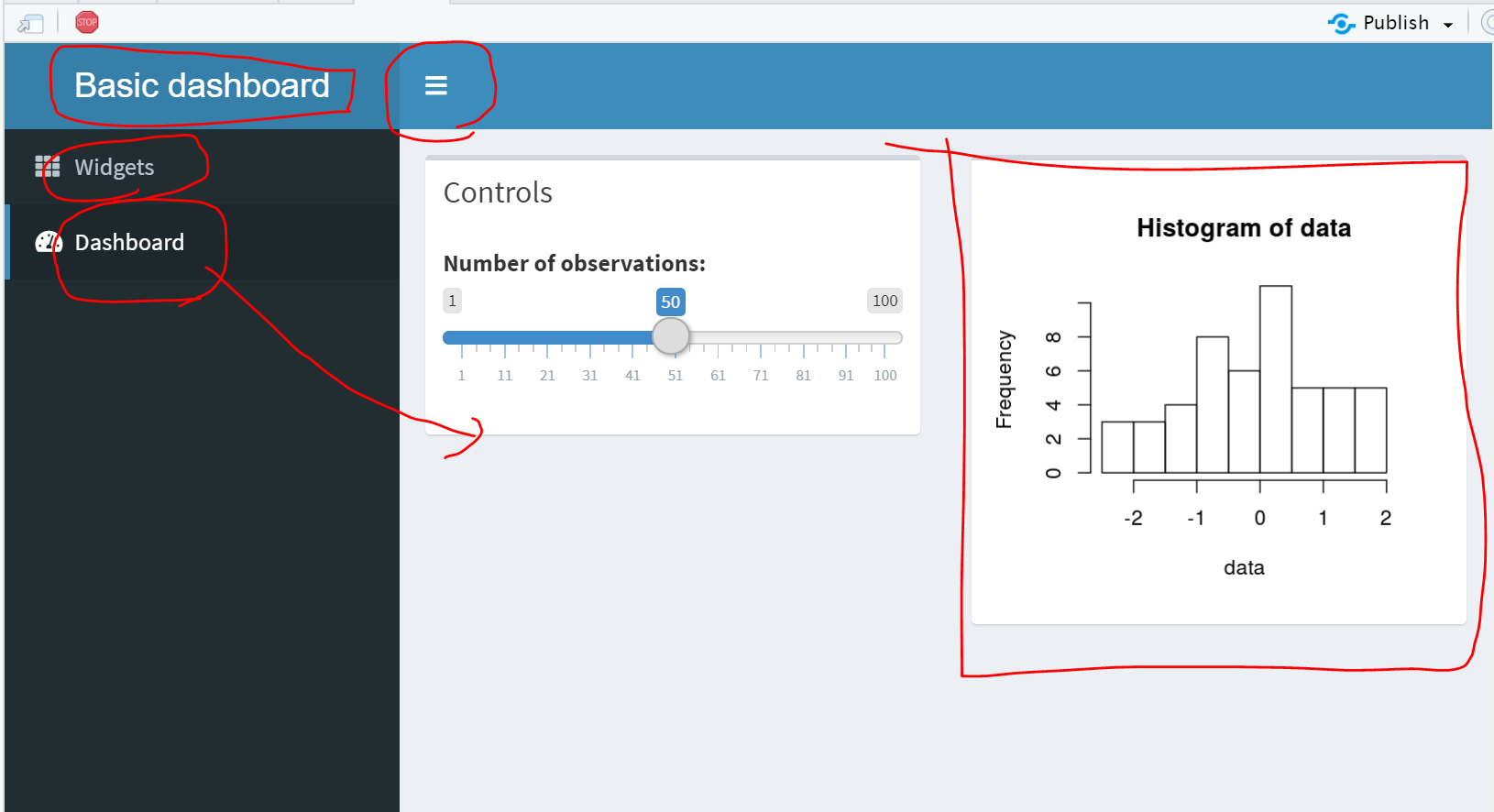
7.2.2 Dashboard UI 기본 구조
대시보드 UI는 다음 세개의 부분으로 구성됨
- header
- sidebar
- body
예제:
app.Rlibrary(shiny) library(shinydashboard) ui <- dashboardPage( dashboardHeader(), # header dashboardSidebar(), # sidebar dashboardBody() # body ) server <- function(input, output) { } shinyApp(ui, server)
7.2.3 Another Example app.R
library(shiny)
library(shinydashboard)

ui <- dashboardPage(
  dashboardHeader(title = "대시보드 제목..."), ## header

  dashboardSidebar(## Sidebar
    sidebarMenu(
      menuItem("소개", tabName = "소개", icon = icon("th")),
      menuItem("히스토그램", tabName = "히스토그램", icon = icon("dashboard"))
    )
  ),

  dashboardBody(## Body
    tabItems(
      # First tab content
      tabItem(tabName = "소개",
          fluidRow(
            h2("대시보드 연습입니다...."),
            HTML("메뉴의 [소개]를 클릭.......")
          )
      ),
      # Second tab content
      tabItem(tabName = "히스토그램",
          fluidRow(
          HTML("메뉴의 [히스토그램]를 클릭......."),
          hr(),
          box(
            title = "Controls",
            sliderInput("slider", "Number of observations:", 1, 100, 50)
          ),
          box(plotOutput("plot1", height = 250))
        )
      )
    )
  )
)

server <- function(input, output) {
  set.seed(122)
  histdata <- rnorm(500)

  output$plot1 <- renderPlot({
    data <- histdata[seq_len(input$slider)]
    hist(data)
  })
}

shinyApp(ui, server)
7.3 DB + Shiny
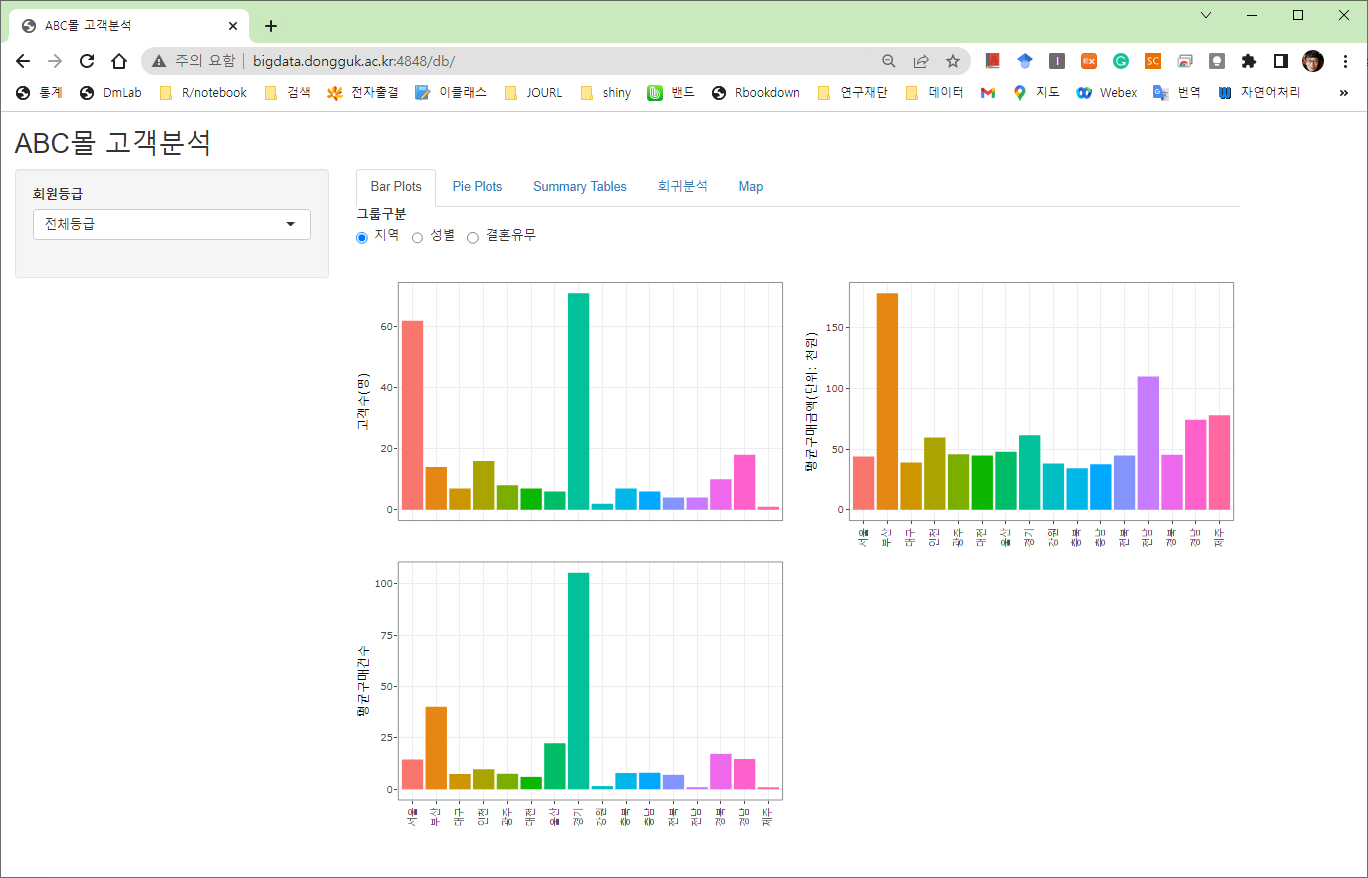
Shiny 코드보기
library(shiny)
library(DT)
library(RMySQL)
library(dplyr)
library(ggplot2)
library(ggpubr)
library(showtext)
showtext.auto()
#
theme_set(theme_grey(base_family='NanumGothic'))

fields <- c("grade", "region")
region = c("전국", "서울","부산","대구", "대전","인천","광주","울산",
           "경기","강원","충북","충남","전북","전남","경북","경남","제주")
grade = list("전체등급","다이아몬드","골드","사파이어","일반")

loadData <- function(grade) {
  con <- dbConnect(MySQL(), dbname = "jskim",
                   host = "localhost",
                   port = 3306,
                   user = "jskim1",
                   password = "Orleans00!")
  dbSendQuery(con, "SET NAMES utf8;")
  query <- "SELECT 회원등급, addr1 AS 지역, 생년월일,성별, 결혼유무, 2012구매건수 as 구매건수,
                   2012구매금액 AS 구매금액 FROM customers"

  if(grade != "전체등급"){
    query <- sprintf("%s WHERE 회원등급 = '%s'",
                     query, grade)
  }

  out <- dbGetQuery(con, query)
  dbDisconnect(con)
  out$지역[out$지역 == "서울특별시"] = "서울"
  out$지역[out$지역 == "부산광역시"] = "부산"
  out$지역[out$지역 == "울산광역시"] = "울산"
  out$지역[out$지역 == "충청남도"] = "충남"
  out$지역[out$지역 == "경기도"] = "경기"

  out  %>% filter(지역 != '""') %>%
    mutate(
      결혼유무 = factor(ifelse(결혼유무 == 'Y', "기혼", "미혼")),
      성별 = factor(성별, levels=c(1, 2), labels=c("Male", "Female")),
      구매금액 = 구매금액/1000,
      지역 = factor(지역, levels=c("서울","부산","대구", "대전","인천",
                                   "광주","울산","경기","강원","충북",
                               "충남","전북","전남","경북","경남","제주")))
}

ui = fluidPage(
  titlePanel("Dongguk 쇼핑몰 고객정보 검색"),

  sidebarLayout(
    sidebarPanel(
      selectInput(inputId = "grade", label = "회원등급", choices = grade),
      width = 3
    ),
    mainPanel(
      tabsetPanel(
        tabPanel("Plots",
                 radioButtons("group1","그룹구분",
                              choices = list("지역","성별","결혼유무"),
                              selected="지역", inline = T),
                 plotOutput("boxplot", height = "650px")
                 ),
        tabPanel("Summary Tables",
                 radioButtons("group2","그룹구분",
                              choices = list("지역","성별","결혼유무"),
                              selected="지역", inline = T),

                 DT::dataTableOutput("responses"))
      )
    )
  )
)

server = function(input, output, session) {
  output$responses <- DT::renderDataTable({
    o = loadData(input$grade)
    if(input$group2 == "지역"){
      o = o %>% group_by(지역)
    }else if(input$group2 == "성별"){
      o = o %>% group_by(성별)
    }else{
      o = o %>% group_by(결혼유무)
    }
    o = o %>%
      summarise(
        고객수 = n(),
        구매건수_M = mean(구매건수),
        구매건수_SD = sd(구매건수, na.rm = T),
        구매금액_M = mean(구매금액),
        구매금액_SD = sd(구매금액)
      )
    datatable(o, rownames=F, class = 'cell-border stripe') %>%
      formatStyle(1, target = "cell",fontWeight='bold') %>%
      formatCurrency(3:ncol(o), currency = "", interval = 3, mark = ",", digits=1)
  })

  output$boxplot <- renderPlot({
    o = loadData(input$grade)
    if(nrow(o) > 2){
        o = o %>% mutate(건당구매금액 = 구매금액/구매건수)
        if(input$group1 == "지역"){
          o = o %>% group_by(지역)
        }else if(input$group1 == "성별"){
          o = o %>% group_by(성별)
        }else{
          o = o %>% group_by(결혼유무)
        }
        o = o %>%
          summarise(고객수=n(),
                  평균구매건수 = mean(구매건수, na.rm=T),
                  평균구매금액 = mean(구매금액, na.rm=T))
        g1 = ggplot(o, aes_string(x=input$group1, y="고객수", fill=input$group1)) +
          geom_bar(stat="identity") +
          ylab('고객수(명)') +
          xlab("") +
          theme_bw(base_size = 15) +
          theme(axis.text.x=element_text(angle=90, hjust=1),
                legend.position = "none")
        g2 = ggplot(o, aes_string(x=input$group1, y="평균구매금액", fill=input$group1)) +
          geom_bar(stat="identity") +
          ylab('평균구매금액(단위: 천원)') +
          xlab("") +
          theme_bw(base_size = 15) +
          theme(axis.text.x=element_text(angle=90, hjust=1),
                legend.position = "none")
        g3 = ggplot(o, aes_string(x=input$group1, y="평균구매건수", fill=input$group1)) +
          geom_bar(stat="identity") +
          xlab("") +
          theme_bw(base_size = 15) +
          theme(axis.text.x=element_text(angle=90, hjust=1),
                legend.position = "none")
        ggarrange(g1, g2, g3,
          labels = c("A", "B", "C"),
          ncol = 2, nrow=2)
    }else{
      NULL
    }
  })
}

# Run the application
shinyApp(ui = ui, server = server)